
A centralized platform for Brazilian Jiu-Jitsu
Designing a mobile application that connects practitioners, accelerates learning, and builds community in one of the world's fastest-growing martial arts.
Type
Mobile Application
Project
Individual Springboard Project Capstone
Role
UX/UI Designer
Time
Jan - Jul 2023
01 — Problem Statement
BJJ has no central home.
The deeper I got into Brazilian Jiu-Jitsu, the more something felt off — not on the mat, but around it. I loved the training, the friendships, the grind. But I was also dealing with injuries I didn't know how to manage, schedule conflicts that made consistency hard, and a constant feeling of being disconnected from the broader community. Every time I wanted to drill a technique I'd seen at a tournament, I was bouncing between YouTube rabbit holes, paid instructionals on BJJ Fanatics, Reddit threads, and whatever my gym's group chat happened to surface that week. Nothing connected. Nothing was built for the practitioner's actual journey.
Despite being a globally recognized sport, Brazilian Jiu-Jitsu had almost no meaningful digital infrastructure. Most learning happened through scattered, unstructured platforms that weren't designed with BJJ in mind at all. I also noticed something harder to talk about — women in the sport, already navigating a heavily male-dominated environment, had even fewer resources tailored to their specific experience. That combination of a fragmented ecosystem and an underserved community became the spark for Oss Mobile.
Issues
Fragmented ecosystem
No Central Learning Hub
Women Underserved
Scheduling Friction
Weak Community Tools
Low Tech Adoption
Mission
"To empower Brazilian Jiu-Jitsu practitioners with a centralized platform that simplifies learning, supports consistent training, and promotes a healthier, more sustainable lifestyle on and off the mats."
02 — Research & Discovery
Listening before designing.
My instinct told me what the problems were — but instinct alone isn't design research. Before sketching a single screen, I needed to hear from real practitioners. I conducted 9 user interviews with a deliberate mix: 7 males, 2 females, ranging from total beginners to active competitors, plus a few non-practitioners to understand the sport's perception from the outside. That diversity was intentional. I wanted to capture the full spectrum — what it feels like to walk into a gym for the first time, and what it feels like to be the only woman in the room during a 6am session.
The interviews covered how people track their training, what challenges they face learning both digitally and physically, how they build community within the sport, and how they manage health and recovery. From 120+ raw observations, I ran an affinity mapping exercise — clustering insights into six core themes that would go on to shape every design decision I made.
01
Learning & Training
Users want structured ways to improve technique outside of class, at their own pace.
02
Community & Trust
Finding reliable, compatible training partners is a persistent, real frustration.
03
Women's Experience
Female practitioners face unique challenges navigating a heavily male-dominated sport.
04
Competitiveness
Competitors need structured prep tools, not just motivation — timelines, coaching, data.
05
Discipline & Time
Consistency is the biggest obstacle. Life gets in the way. Scheduling is a real problem.
06
Technology
BJJ lags behind other sports in tech adoption — users are hungry for better tools.
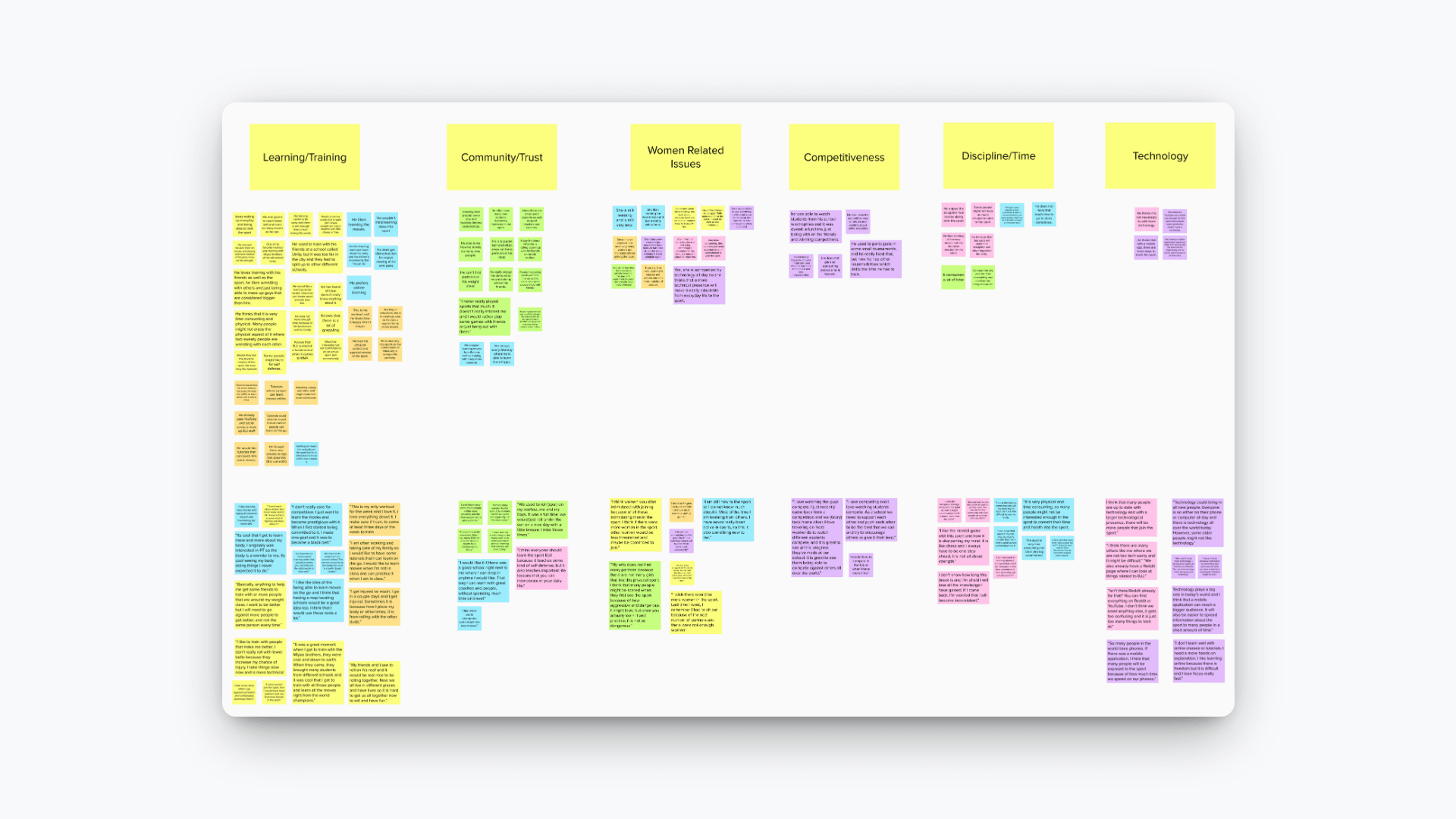
Click on the affinity map to access the full map on Mural.
"The affinity map told me what users were doing. The empathy map told me how it felt. Together, they gave me the clearest picture of who I was really designing for."
Maria Garcia

“I am always on the move and doing things for others. I wish I had more free time to do things I enjoy.”
Age: 35
Work: Nurse
Family: Husband and 2 kids
Location: New York
Education: Bachelors Degree
Bio
Maria Garcia Is a mother of two. She works as a nurse during the day. When she is not working, she is often with her family. She enjoys learning new things and does JuJitsu for self defense and to release stress.
Goals
Wants to learn as much as she can in BJJ.
Be able to use these moves in self defense.
Achieve her weight loss goal.
Frustrations
Too many responsibilities, not enough free time.
Not enough training partners.
Long tiring hours at work.
Personality
Introvert
Extrovert
Intuitive
Analytical
Cautious
Adventerous
Passive
Active
Preferred Channels
Social Media
Mobile
Computer
03 — Competitive Analysis
What exists today.
Before designing anything, I needed to understand the existing landscape — where practitioners were already spending their time and why those platforms kept falling short. I ran a SWOT analysis on the four platforms most commonly used in the BJJ space. The finding that stood out most: not one of them was actually built for BJJ. They were general platforms that the community had adapted out of necessity.
YouTube
Unstructured · No community

Strengths:
Large collection of videos, both long and short.
Users can learn almost all the moves from videos.
Weaknesses:
Not much organization; skill level in videos varies drastically.
Too much information can be overwhelming.
Opportunities:
Develop curated learning playlists for different skill levels.
Offer instructor-led live training sessions.
Threats:
Oversaturation of content can overwhelm new learners.
No community-building features beyond comments.
BJJFanatics
Pay-walled · Competitor-focused
Reddit (r/bjj)
Community only · No tools
Jiujitsu Five-O
Niche · Limited reach
Jiu-Jitsu Five-O was the most relevant competitor — it had the right vision but was held back by paywalls and an incomplete feature set. That gap confirmed what the research was already telling me: there was a real opportunity to build something purpose-built for the practitioner's full journey, combining learning, community, competition prep, and inclusivity in one place. That became the north star for Oss Mobile.
04 — Design Process
From flows to fidelity.
With research and personas locked in, I moved into design strategy. Before touching wireframes, I defined four principles that would guide every decision: teach techniques in real training contexts, layer complexity so beginners aren't overwhelmed, combine learning, health, and community in one seamless experience, and keep interactions fast enough to use at the gym between rounds.
From there, I mapped user flows and identified the red routes — the three critical paths that mattered most to my personas. These flows became the skeleton of the app before a single screen was drawn, making sure I was solving real problems, not designing features in a vacuum.
01
User Flows
02
Red Routes
03
Low Fidelity Wireframes
04
User Testing
05
High Fidelity Wireframes
The low-fidelity wireframes were built around the three red routes that both personas touched most. I kept them intentionally rough — the point was to validate structure and flow, not visual polish.
🏆
Competition Prep
A dedicated section for competitors — tournament sign-ups, 1-on-1 coaching bookings, and a doctor referral system for injury management leading up to an event.
🎯
Move Knowledge
A full technique library with tutorials on chokes and submissions, live coaching via video call, and fight analysis breakdowns — so users can study the game beyond the mat.
🤝
Find Training Partners
A training partner locator, community chatrooms, and a gamified leaderboard — designed with women practitioners in mind to make finding safe, compatible partners easier and less intimidating.
05 — User Testing
Testing revealed the friction.
Once the low-fidelity prototype was wired together, I put it in front of real users. I gave them specific tasks to complete — navigating to a coach booking, finding a move tutorial, locating a training partner — and watched carefully without guiding them. What I observed was humbling and incredibly useful. Five critical issues surfaced that, left unresolved, would have broken the core experience.
Back navigation failure
Users could not reliably return to a previous screen. In a mobile app, broken back navigation kills trust immediately — it was the most critical fix on the list.
Insufficient wayfinding
Without clear cues or instructions, users hesitated on screens that should have been intuitive. The app wasn't communicating where users were or what to do next.
Animation inconsistency
Buttons and page transitions behaved differently depending on where you were in the app. The lack of a consistent motion system made the experience feel unpolished and disjointed.
Cross-section navigation
Switching between major sections of the app felt opaque. Users couldn't tell where they were or how to get somewhere else without backtracking multiple times.
State reset failures
Countdown timers, buttons, and menus held their previous state when users returned to a screen. Small bugs like these erode confidence in the product fast.
06 — High Fidelity Solutions
Every issue resolved.
User testing gave me a clear repair list. Moving into high fidelity wasn't just about making things look better — it was about systematically resolving every issue that had been flagged and building a more coherent design system in the process. Each solution required thinking beyond the visual layer into how components, state, and navigation should actually behave.
Global back-button component
I built a reusable back-navigation component that consistently returns users to their previous screen, no matter where they are in the app. One component, applied everywhere, solved the most critical issue.
Contextual pop-up guidance
I introduced in-context tooltips and instructional overlays that activate at key decision points — giving users just enough information to move forward confidently without cluttering the interface.
Unified animation system
I audited every interaction across the app and established a consistent motion language — same easing, same timing, same behavior for buttons and transitions throughout. Cohesion over cleverness.
Section-linked navigation
I added tappable section labels and built a section selector into the registration flow — so from day one, users understood the app's structure and could navigate it with confidence.
Proper state reset logic
Every variable state — timers, toggles, menus — was reviewed and set to reset correctly when users exit and return to a screen. The details no one notices when they work, and everyone notices when they don't.
Explore the interactive prototype in FIgma
View Prototype
07 — Takeaways
What I learned.
This was my first full UX/UI project from end to end — 23 weeks, solo, on a subject I genuinely cared about. Designing something for a sport you love adds a layer of responsibility: you're not just solving an abstract problem, you're building for people like yourself. Three lessons from this process will follow me into every project I take on.
01
More eyes catch more problems
Because I'd lived inside the project for months, I stopped seeing it clearly. User testing snapped me back to reality. The issues users flagged were things I'd completely stopped noticing. Collaboration — whether that's a co-designer, frequent testing, or structured critique — isn't a luxury. It's how good design actually gets made.
02
Mobile design is its own discipline
I came in thinking mobile design was just web design at a smaller size. I was wrong. The interaction model is fundamentally different — no hover states, different gesture logic, different spatial expectations. Even something as simple as icon selection carries more weight on mobile, where a misread icon can completely derail a user's flow. I came out of this with a much deeper respect for mobile-first thinking.
03
Consistency is a UX feature
A coherent design system isn't just about aesthetics — it's about trust. When users can predict how an interface will behave, they stop thinking about the interface and start focusing on their goal. Inconsistent animations, unpredictable navigation, and broken state logic all chip away at that trust quietly, one interaction at a time.